


Software without detours.

Thomas Ulrich
Desktop apps, web tools
& AI workflows
From Austria

Open for projects
Portfolio 2026
4 released
3 in the works
Portrait of Thomas Ulrich in front of a concrete wall
Thomas Ulrich UT-Systems · Austria

(01) About

One developer. Every step.

I'm Thomas Ulrich, and I build software under the name UT-Systems — from the first sketch to a product you can buy.

Interface, code, release, pricing and support are all in my hands. That forces clear decisions — and software that works without a manual.

I care about tools you use every day and barely notice: a window layout that is simply back. A data model you can finally see. An approval you give without switching windows.

Location
Austria
Focus
Windows desktop · Web · Data visualization · AI workflows
Education
Digital Transfer Manager · University of Applied Sciences Upper Austria, Wels
Sold via
Microsoft Store · Web
Languages
German · English

How I work

No account. No telemetry. No cloud where it isn't needed. Software should run on your device — and leave your data there.

01

Local first

Watchbird talks to the agents over a local pipe. Toolorio and PLMGraph process files right in the browser — no upload.

02

Buy, don't rent

Tern Files, Watchbird and DeskScene cost once, not every month. A tool is something you should be able to own.

03

Cleanly reversible

Before Watchbird changes a configuration, it makes a backup — and removes its entries with one click whenever you want.

Sounds like a fit for your plans? Tell me about it.

(02) For companies

My expertise for your company.

My products come entirely from one pair of hands: concept, design, development, release and support. I work the same way for companies — on internal tools that are missing from day-to-day work, or on products that are meant for the market.

  1. 01

    Windows desktop software

    Tray apps, global hotkeys, multi-monitor setups, window management and integrations with existing tools — including packaging, licensing with a trial period and publishing on the Microsoft Store.

  2. 02

    Web apps & browser tools

    Fast web applications that process files right in the browser. No server ever sees the data — which makes data protection and internal sign-off much simpler.

    Proven by Toolorio PLMGraph
  3. 03

    Data visualization & analysis tools

    Making complex structures visible: turning exports and files into interactive graphs, comparisons and audit reports — right in the browser, without the data ever leaving the building.

    Proven by PLMGraph
  4. 04

    AI-assisted development

    Bringing coding agents like Claude Code or Codex into a team so that speed does not come at the cost of control: approval workflows, hooks, guidelines and the right tools for everyday work.

    Proven by Watchbird

What I work with

Desktop

  • C#
  • .NET 8 & 10
  • WinUI 3
  • WPF
  • Windows App SDK
  • Win32 interop
  • MSIX · Microsoft Store

Web

  • TypeScript
  • Next.js
  • React
  • Tailwind CSS
  • React Flow
  • Vercel

Local in the browser

  • WebAssembly
  • ffmpeg.wasm
  • Tesseract.js
  • Transformers.js
  • pdf-lib · PDF.js

Other tools

  • Python
  • xUnit
  • Vitest
  • Sentry
  • GitHub
  • Claude Code

How we work together

  1. 01

    Conversation

    You describe the task, I ask questions. No strings attached, e.g. on a video call.

  2. 02

    Proposal

    Scope, approach and effort in writing — concrete enough for you to decide.

  3. 03

    Build

    In short steps with working interim versions instead of a surprise at the end.

  4. 04

    Handover

    Installable, documented and, if you like, with maintenance and further development.

Have a tool in mind that doesn't exist yet?

Discuss your project

(03) Work

Four products on the market. Three in the workshop.

I conceived, designed and built everything here myself — and I keep looking after it. The illustrations are simplified recreations of the real interfaces; Tern Files shows a real screenshot.

Released 04

01 / 07 Windows app Live

Tern Files

Like Explorer, only faster.

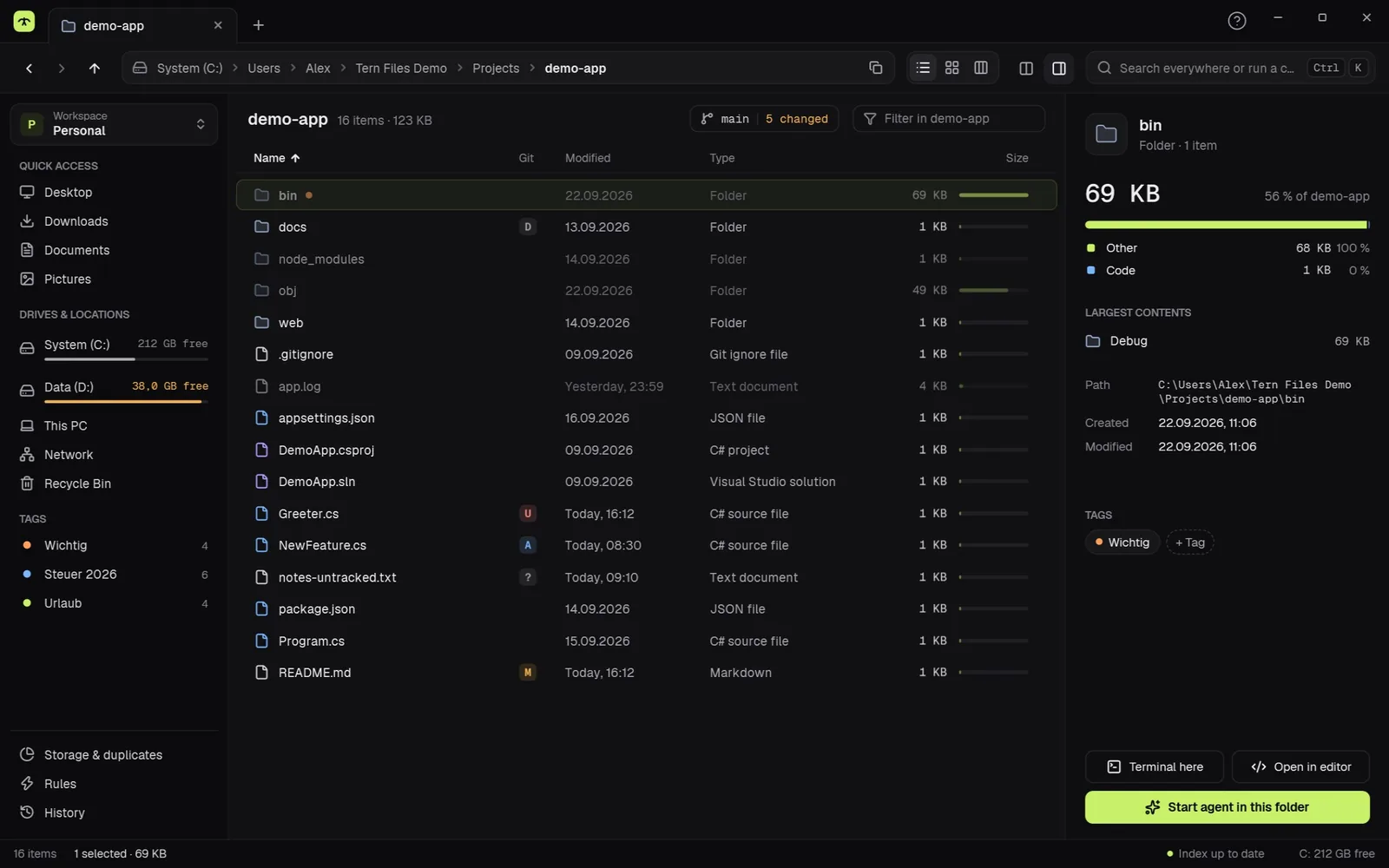
A file manager for Windows with tabs and two panes, instant search across all drives, preview with the space bar and folder sizes at a glance. Plus duplicates, batch rename and a local AI that tidies up — no cloud, no account, no subscription.

Platform
Windows 10 & 11 · x64 & ARM64
Pricing
14 days of everything free · Pro €34.99 one-time
Search
11 ms across 2 million files
Data
Local · no account · no telemetry
Tern Files main window with tabs, folder sizes and Git status
Fig. 01 — Real screenshot of the app ternfiles.com
02 / 07 Windows app Live

Watchbird

The notch for AI coding agents on Windows.

Watchbird adds a small notch to the top edge of the screen. It shows what Claude Code, Codex, Copilot CLI and seven other agents are doing right now — and lets you approve their changes, answer their questions and review plans without switching windows.

Platform
Windows 10 & 11 · Microsoft Store
Pricing
€19.99 one-time · 15-day trial
Agents
10, including Claude Code, Codex, Copilot CLI
Data
Local · no account · no telemetry
Fig. 02 — Approval straight from the notch watchbird.app
03 / 07 Windows app Live

DeskScene

Save window layouts. Bring them back with a hotkey.

DeskScene saves your open windows — position, size, monitor, state — as a profile and restores the whole arrangement with one click, a hotkey or automatically when you dock your laptop.

Platform
Windows 10 & 11 · multi-monitor
Pricing
€9.99 one-time · 7-day trial
Hotkeys
Up to 9 profiles on modifier + 1–9
Automation
Detects monitor setups and loads the matching profile
Fig. 03 — One profile, one keystroke deskscene.app
04 / 07 Web app Live

Toolorio

163 browser tools. No login, no upload.

A free collection of everyday tools: split PDFs, compress images, format JSON, roll dice. Files are processed locally in the browser and never leave the device.

Platform
Web · any current browser
Pricing
Free, no sign-up
Scope
163 tools in 10 categories
Data
Processed locally in the browser
Fig. 04 — 163 tools in 10 categories toolorio.com

In progress As of September 2026

05 / 07 In progress

PLMGraph

Web app · Aras Innovator

The data model behind Aras Innovator — finally visible.

Reads an Aras package export and shows the whole schema as a graph: item types, relationships, properties and every method attached to them. Plus a comparison between dev and prod and 13 hygiene checks.

Status
Reading is already free to use
Data
Runs in the browser · 0 bytes uploaded
06 / 07 In progress

Stepdok

Windows app · Documentation

Step-by-step guides that write themselves.

Start recording, click through the workflow once as usual — Stepdok turns it into a step-by-step guide with annotated screenshots. Even for specialist software that browser tools can't see.

Status
In development
Data
Fully local · no cloud
07 / 07 In progress

Culling

Desktop app · Photography

AI culling for photographers — local, for a one-time price.

Find the keepers among 3,000 wedding photos in minutes: blurry shots, closed eyes, bad exposures and bursts of near-identical frames are detected. The ratings go to Lightroom or Capture One as XMP files.

Status
In development
Data
Photos stay on your computer

(04) Contact

Tell me about your project.

Helpful in a first message
What it is about, who will use it and when it needs to be ready.
LinkedIn
Thomas Ulrich · Austria
App support
support@ut-systems.com · or via each product’s website
Legal
Legal notice · Privacy